OneMusic - Music, Mp3 Player
- 4.6
- Rating
- 50.00K
- Installs
- Free
- Price

 Analysis by App-foxy
I approached OneMusic as a practical question rather than a promise: can a lightweight music and audio app make everyday listening easier, especially when I want downloaded songs, offline playback, and playlists without building my routine around a larger streaming service? After spending time with it, my answer is yes, with an important qualification. It is most appealing when you already have music you are allowed to store and want a straightforward place to organize and play it.
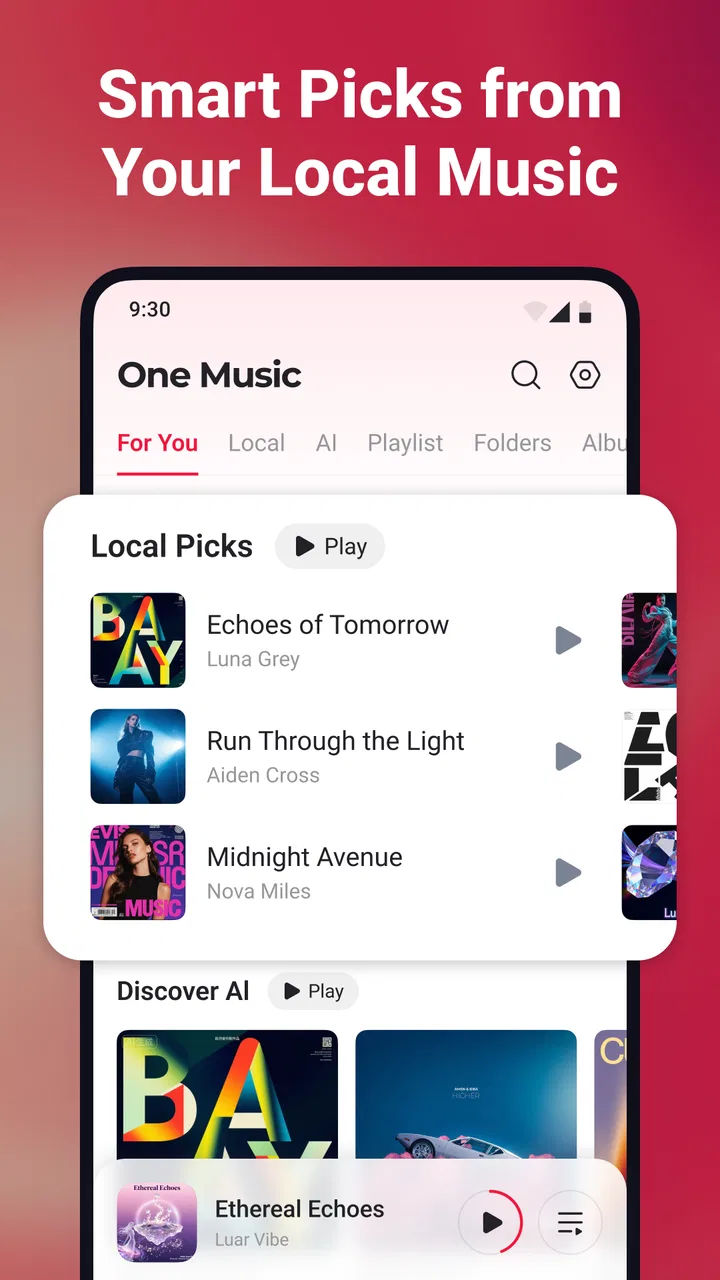
OneMusic is a free Android music app from Dovi Tools, listed for Everyone and compatible with Android 8.0 or later. Its store positioning is simple, but that simplicity is also the point. Instead of asking me to learn a complicated audio ecosystem, it focuses on downloading songs, listening without a connection, and creating playlists. The app currently stands at version 1.1.5, with a 4.6 average from over 300 ratings and more than 50 thousand installs, so it has attracted a meaningful early audience without feeling like an overbuilt platform.
How I Decide Whether OneMusic Fits
My first test for any music app is the source of the music. OneMusic makes sense for someone who wants a local listening workflow: save songs for later, keep them available offline, and arrange them into personal playlists. That is a different need from discovering a huge catalog, following artists, or sharing listening activity with friends. If those social and discovery features are central to your routine, a full streaming service may remain the better choice.
You May Also Like

 AccuWeather: Weather Radar
AccuWeather Review: A Quick, Clear Forecast for Everyday Decisions
For everyday plans, the best forecast is the one you can understand quickly. AccuWeather makes rain timing, radar, and local conditions easy to act on, with a few trade-offs.

 Hill Climb Racing
Why Hill Climb Racing Still Turns Crashes Into One More Run
A tiny car, a bumpy hill and one more upgrade: Hill Climb Racing keeps resurfacing because its simple chaos makes every near-miss feel personal.

 AliExpress - Shopping App
AliExpress Makes Global Shopping Feel Personal, but Shoppers Bear the Risk
AliExpress turns a global marketplace into a pocket-sized discovery engine. Its reach is useful, its shopping loop compelling, and its trade-offs easy to miss.

 Lords Mobile: Kingdom Wars
Lords Mobile Is a Kingdom-Building Routine, Not a Quick Match
A case-by-case verdict on the building, battles, device demands, and social commitments that make Lords Mobile rewarding for some players and exhausting for others.

 PDF Scanner app - TapScanner
TapScanner Makes Paperwork Easier to Capture, Check, and Share
TapScanner makes scanning with a phone feel less like a rescue operation and more like a dependable step in getting work done. Its capture tools are useful, though not flawless.

 Block Blast!
 Shows How Much a Puzzle Game Can Leave Out
A quiet grid game shows why puzzle players increasingly value instant clarity, repeatable skill and low-pressure play—and where the genre still needs to catch up.
More From Our News Desk
View All News


The second test is reliability during ordinary interruptions. I often listen while travelling, in places with inconsistent reception, or when I simply do not want music playback competing with other online activity. Offline access changes the experience because I can prepare a playlist before leaving and avoid making the quality of the listening session depend on the network. For me, that is more useful than a long list of features I would rarely touch.
The third test is control. A local player should make it easy to decide what belongs in a playlist, how I want to group it, and when I want to listen. OneMusic’s emphasis on unlimited playlists is valuable here. I can separate music by activity instead of forcing everything into one large queue: a focused work list, a short evening selection, or a collection reserved for travel. The practical benefit is not the number of playlists itself; it is the freedom to organize music around real habits.
I also consider the effort involved in changing apps. If your existing player already handles your files, remembers your position, and gives you the controls you need, moving may not be worthwhile. A new player is valuable when it solves a specific irritation, such as awkward playlist management or dependence on an internet connection. OneMusic is easier to justify when offline listening and simple organization matter more to you than advanced catalog features.
What the everyday workflow feels like
A realistic use case is a commute that begins with a reliable connection and ends somewhere it does not. I would prepare a few playlists at home, download the songs I expect to hear, and then use the app as a local player during the journey. That preparation step is important: offline listening works best when treated as part of planning, not as something to solve after the signal disappears.
I find a second use case in keeping different parts of my listening separate. Rather than searching for the same tracks repeatedly, I can make a playlist for concentration and another for exercise, then maintain them as my preferences change. This is a small workflow improvement, but it reduces friction over time. An app that lets me create as many playlists as I need is better suited to this style than a player designed mainly around one library view.
There is also a useful distinction between downloading a song and merely saving a shortcut to it. When I want music available away from a connection, I need to think about whether the actual audio has been stored for offline use. I would prepare downloads while connected, verify that the songs appear ready to play, and only then leave. That habit prevents the common mistake of assuming that a playlist alone guarantees offline playback.
Where it wins over the usual alternatives
OneMusic’s strongest advantage is focus. A large streaming service usually combines playback with recommendations, subscriptions, artist pages, synchronized accounts, and a constantly changing catalog. Those tools can be excellent, but they also make the experience feel dependent on the service. OneMusic is more attractive when I want the app to stay close to the basic job: get music ready, play it offline, and keep it organized.
Compared with a basic phone music player, the appeal is the clearer emphasis on downloading and playlist creation. A preinstalled player may be perfectly adequate for browsing files, but it may not match the workflow I want when I am building several listening groups. OneMusic gives that organization a more central role, which can make it a better fit for people who think in playlists rather than folders.
It can also be preferable to a browser-based listening routine. Opening a website each time I want music adds steps and leaves the experience more exposed to connection problems. A dedicated app is easier to reach and better suited to repeated offline use. I would not call that a dramatic transformation, but removing a few repeated steps is exactly the kind of improvement I notice after using an app for several days.
Another quiet strength is that the free entry point makes experimentation easy. I can try the workflow without committing to a recurring subscription. That matters if I am unsure whether a local music app will fit my habits. The app includes in-app purchases ranging from $1.99 to $49.99 per item, so I would review any purchase screen carefully before confirming anything, especially if I only want the basic listening experience.
Small decisions that make the app more useful
My first practical tip is to design playlists by situation instead of by broad genre. “Music” is too vague to help when I am in a hurry. A playlist named for a commute, a workout, or a quiet evening gives me a clear starting point and reduces the temptation to reorganize everything later. Since OneMusic supports unlimited playlists, I can use specific groups without worrying about running out of room.
My second tip is to download in batches. If I know I will be offline tomorrow, I would prepare the complete set of songs today rather than adding tracks one at a time during the journey. Batch preparation makes it easier to notice an incomplete selection and keeps the offline library intentional instead of turning it into a random accumulation of songs.
A third insight is that offline listening changes how I judge playlist length. A huge playlist may sound convenient, but it can become difficult to navigate when I am disconnected and cannot quickly search for something else. I prefer several focused playlists with a clear purpose. The app’s unlimited-playlist approach supports that structure, but it also places the responsibility for organization on me.
Finally, I would treat downloads as a maintenance task. When my preferences change, I would remove songs I no longer play and refresh the playlists I use most. This is especially helpful for people who store a lot of audio on their phone. The best local player is not the one with the most files; it is the one whose library remains easy to understand.
Where Another Type of App May Fit Better
OneMusic is not the right choice for everyone. If your main goal is discovering unfamiliar artists, following new releases, or moving seamlessly between devices through an account-based library, a mainstream streaming platform may fit better. Those services are built around access to a broad online catalog, while OneMusic is better understood as a focused tool for prepared, offline listening.
I would also hesitate to switch if I rely heavily on collaborative playlists or social sharing. OneMusic’s appeal is personal control, not a community layer. Someone who regularly exchanges playlists with friends may prefer an app where sharing is part of the central experience. Choosing OneMusic in that situation could mean giving up a familiar social workflow in exchange for simpler local playback.
People who want detailed audio customization should also compare carefully before moving. OneMusic’s clear appeal is convenience and organization, not an enthusiast-oriented control panel. If your decision depends on specialized sound shaping, extensive playback tools, or a very particular library-management system, you should test whether the app matches those expectations before making it your main player.
The same applies to users who already have a well-organized collection in another app. Switching can require rebuilding playlists, checking downloads, and learning where everyday controls are located. None of that is difficult, but it is still time. I would switch only if OneMusic’s offline and playlist workflow solves a problem I actually experience, rather than because a new player sounds interesting.
The age rating of Everyone makes the app broadly approachable, including for households looking for a simple music player. Still, “easy to use” should not be confused with “requires no setup.” The most satisfying experience comes from spending a little time preparing downloads and arranging playlists. A person who wants instant access to an enormous online library may find that preparation less convenient than it is useful.
What switching really costs
The financial barrier is low because the app is free to install, but the real cost is organizational. I would need to decide which songs belong in the new library, recreate the playlists that matter, and confirm that the tracks I want are available for offline use. If my current setup is already tidy, that work may outweigh the benefits. If my current setup is scattered, the move could be a good opportunity to simplify.
There is also a habit cost. People often underestimate how much they depend on small behaviors such as automatic recommendations, familiar search, or a remembered queue. OneMusic asks me to be more deliberate: choose what I want, download it, and arrange it. I see that as a strength when I want control, but a weakness when I want the app to make listening decisions for me.
I would approach the change gradually. I would begin with one playlist for a specific routine, use it offline, and see whether the process feels natural. If that test works, I would move more of my listening over. This avoids rebuilding everything at once and gives me a fair sense of whether the app improves my day or merely duplicates what I already have.
Version 1.1.5 suggests a relatively focused product rather than a mature, all-purpose music ecosystem. That is not automatically negative. A smaller scope can mean less clutter and a clearer purpose, but it also means I would choose it for the workflow it offers now, not for features I hope may appear later. The current experience should be enough to justify the switch on its own.
My recommendation for different listeners
I recommend OneMusic to Android users who want a straightforward way to prepare songs for offline playback and organize them into as many personal playlists as they need. It is particularly well suited to commuters, travellers, and anyone who already has a collection of music and prefers not to depend on a live connection every time they listen.
I would recommend it less strongly to listeners whose priority is discovery, social sharing, cross-device synchronization, or access to a constantly expanding streaming catalog. For them, the usual category leaders may provide a more complete experience, even if that experience is busier and more dependent on an account or connection.
My final view is that OneMusic succeeds by keeping its decision simple: choose it when offline access and personal playlist control are the problem you want solved. The free starting point makes it easy to try, while the in-app purchase range means I would pay attention during setup and select only what I genuinely need. Its best quality is not doing everything; it is making prepared, personal listening feel uncomplicated.
After using it, I would keep OneMusic as a strong option for a local-first music routine rather than as a replacement for every kind of music service. If that distinction matches the way you listen, OneMusic is worth trying. If you want an app to continually discover music for you, the better decision is to stay with a broader streaming alternative.
FAQs for OneMusic - Music, Mp3 Player
01What are the key features of OneMusic?
OneMusic offers a seamless music listening experience with features like offline playback, customizable equalizer settings, and playlist creation. It supports multiple audio formats, including MP3, AAC, and FLAC. The app also includes a sleek, user-friendly interface and integrates easily with smart devices for a personalized music experience.
02Does OneMusic require an internet connection?
OneMusic allows offline playback, meaning you can listen to your downloaded tracks without an internet connection. However, to stream new music or access online features such as music discovery and updates, an active internet connection is necessary. This flexibility makes it ideal for users with varying internet access.
03Is OneMusic free to use, and are there any in-app purchases?
OneMusic is available for free, providing a range of essential features at no cost. However, it offers a premium version through in-app purchases. The premium version removes ads, unlocks advanced features like enhanced audio settings, and offers a more immersive, ad-free listening experience.
04How does OneMusic handle music library organization?
OneMusic excels in organizing your music library with options to sort tracks by artist, album, genre, or custom playlists. Users can easily search and manage their collections, ensuring a smooth and intuitive experience. The app also supports tagging and metadata editing to keep your library neat and accessible.
05Is OneMusic compatible with all Android and iOS devices?
OneMusic is designed to be compatible with most Android and iOS devices, supporting a wide range of versions. Regular updates ensure compatibility with newer operating systems. Before downloading, check the app’s requirements to ensure your device is supported for the best performance.
Pros
- Intuitive and user-friendly interface.
- Extensive music library access.
- High-quality audio playback.
- Customizable playlists and themes.
- Offline listening available.
Cons
- Ads can be intrusive.
- Limited free features.
- Occasional playback glitches.
- Subscription required for premium.
- No lyrics integration.

OneMusic - Music, Mp3 Player
Gallery